Adding new users
Navigate to
<server_root>/users, where<server_root>: the folder where the files used by the documentation server are stored.Copy and paste the
templatefolder in the<server_root>/users. Then rename the folder with your username (this will be yourusernamein the remainder of these instructions).Add the new user to the existing list of users on the documentation server.
Open
<server_root>/users/index.htmlwith a text editor (e.g. Notepad++ on Windows).Search for the
userListcode block (highlighted in the screenshot below).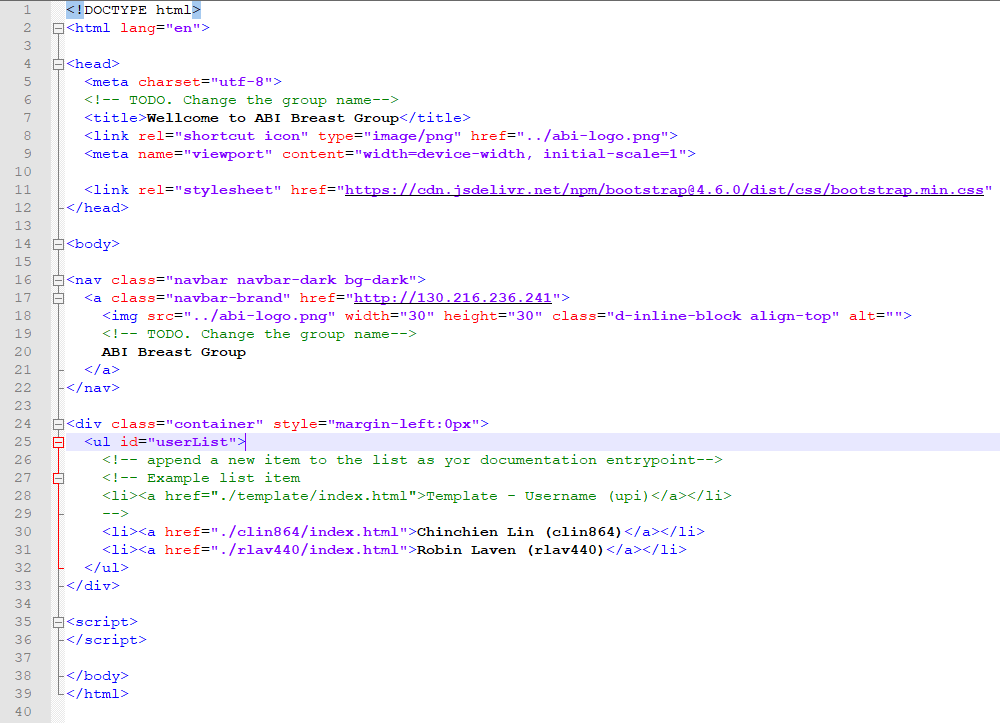
index.html
Append the following new line under the
userList.<li><a href="./username/index.html">your full name</a></li>
Replace
usernamewith the folder name from step 2.Replace
your full namewith your full name.
Customise the new user’s documentation page:
Open
<server_root>/users/<username>/index.htmlwith a text editor (e.g. Notepad++ on Windows).Search for the
<h1>tag in this file. The line corresponding to this tag shows:<h1>Username's documentation</h1>Replace
Usernamewith your username.
Save and exit the file.